
Keep every bay, job, and technician connected
Right now the job lives in six places at once: the whiteboard, the paper folder, the group text, the camera roll, one thing somebody shouted across the bay, and memory. None of them can tell the whole shop where the repair actually is.
One record. Appointment through payment.
BayNerve is auto repair shop management software for independent repair shops. Write the work order once. Assign the technician and bay. Document the repair from the floor. Keep the inspection, approval, labor, invoice, payment, and vehicle history on the same job.
Cancel anytime. No implementation fee. No per-seat pricing.
Product / Work board
See every open repair order in its current state.
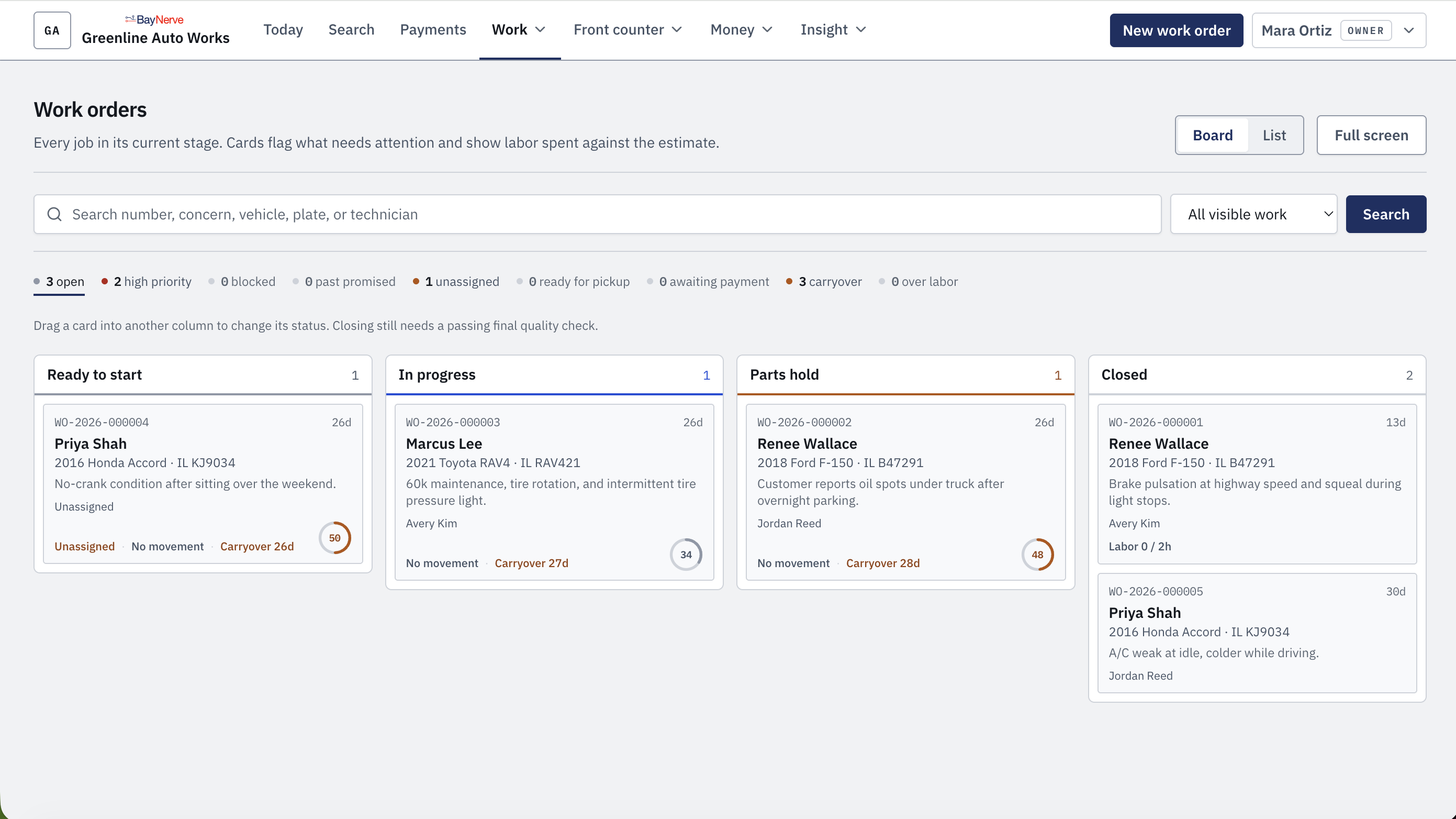
Every card keeps the repair order, vehicle, technician, status, carryover, labor, and next issue close to the work. Moving a card changes the job state. Closing still requires the work to be finished and checked.
The same record continues into the inspection, estimate, customer decision, parts, invoice, payment, and vehicle history.
Illustrative repair / RO-2418 · not a customer record
A parts delay should be visible before somebody has to ask about it.
A 2018 Ford F-150 arrives Tuesday morning with an oil leak. The inspection and approval are recorded. The gasket kit is not on the shelf, so the repair moves to parts hold until Wednesday. The delay stays on the same work order.
23:00
Parts hold / one gasket kit
The clock does not disappear when the shop closes. Tuesday at 10:00 AM to Wednesday at 9:00 AM is still a 23-hour delay.
Clock
Entry on the work order
7:30 AM
Checked in at the counter. Customer, vehicle, concern, promise time, 104,882 mi.
8:00 AM
Assigned to Marcus, Bay 3. The job appears in the technician view.
8:30 AM
Inspection findings added. Six photos and a 41-second voice note stay on the repair order.
9:00 AM
Estimate approved at $412.60. Serpentine belt declined and kept as deferred work.
10:00 AM
Waiting on parts. Gasket kit is not on the shelf. The job moves to parts hold.
Wed 9:00
Part received. Work resumes. The repair returns to the technician queue.
Wed 10:41
Quality check passed. Invoice paid. Repair closed. The record moves into vehicle history.
Repair lifecycle
One repair record from the appointment through vehicle history.
The customer, vehicle, concern, findings, approval, repair, invoice, and deferred work stay connected instead of being rebuilt at every handoff.
01
Appointment
Customer, vehicle, requested service, and promise time.
02
Check-in
Concern, mileage, vehicle condition, and requested work confirmed.
03
Inspection
Findings, photos, and technician notes attached to the job.
04
Estimate
Parts and labor built from the documented repair.
05
Approval
Approved, declined, and deferred lines kept on the work order.
06
Repair
Technician, bay, labor, parts, blockers, and quality check.
07
Invoice
Completed work becomes the invoice and payment record.
08
History
Finished repairs, evidence, invoices, and deferred work stay with the vehicle.
For the whole shop
The front counter and the shop floor work from the same repair order.
Technicians
See assigned work and approvals, document findings, attach photos, record a voice note, log labor, and flag a parts delay from the bay.
Service advisors
Schedule and check in vehicles, build estimates, collect decisions, watch status changes, invoice the repair, and answer the customer from the same record.
Owners and managers
See what is open, blocked, carried over, unassigned, ready for pickup, or waiting for payment without stopping work to ask for an update.
Customers
Review findings, make approval decisions, see the invoice, and keep a clearer record of completed and deferred work.
Core shop management features
The jobs your shop already does, kept in one system.
01
Work orders and status board
Keep the customer, vehicle, requested work, technician, bay, status, labor, parts, approvals, and closeout on the same job.
02
Scheduling and check-in
Book the appointment, confirm the concern and mileage on arrival, and carry that record into the repair order.
03
Digital inspections
Record findings from the bay with notes and photos before the estimate is built.
04
Estimates and approvals
Build the estimate from documented findings and keep approved, declined, and deferred work attached to the repair.
05
Photos, voice notes, and dictated findings
Capture evidence from a phone or tablet and keep it with the repair order instead of a personal camera roll or text thread.
06
Invoices and payment records
Turn completed work into the invoice and keep the payment outcome on the same repair history.
07
VIN decoding and vehicle history
Decode a saved 17-character VIN for available NHTSA vehicle specifications, including trim, engine, body class, drive type, fuel type, and transmission, then keep completed repairs, approvals, invoices, and deferred work with the same vehicle.
08
Roles, filters, reporting, and customer portal
Control access by role, filter the shop board, review shop activity, and give customers a place to review findings, decisions, and invoices.
Integrations
Connect BayNerve with tools your shop already uses.
BayNerve integrates with QuickBooks Online, Stripe, Gmail, and Microsoft Outlook. The BayNerve integrations are included in the shop subscription; connected providers may require their own accounts, subscriptions, or processing fees.
Accounting
QuickBooks Online
Live BayNerve integration.
Payments
Stripe
Live BayNerve integration.
Gmail
Live BayNerve integration.
Microsoft Outlook
Live BayNerve integration.
Technician view
The repair order goes to the bay without turning into another conversation.
The front counter sees the whole queue. The technician sees the work assigned to the bay. Both are working from the same current record.
Technician view / phone
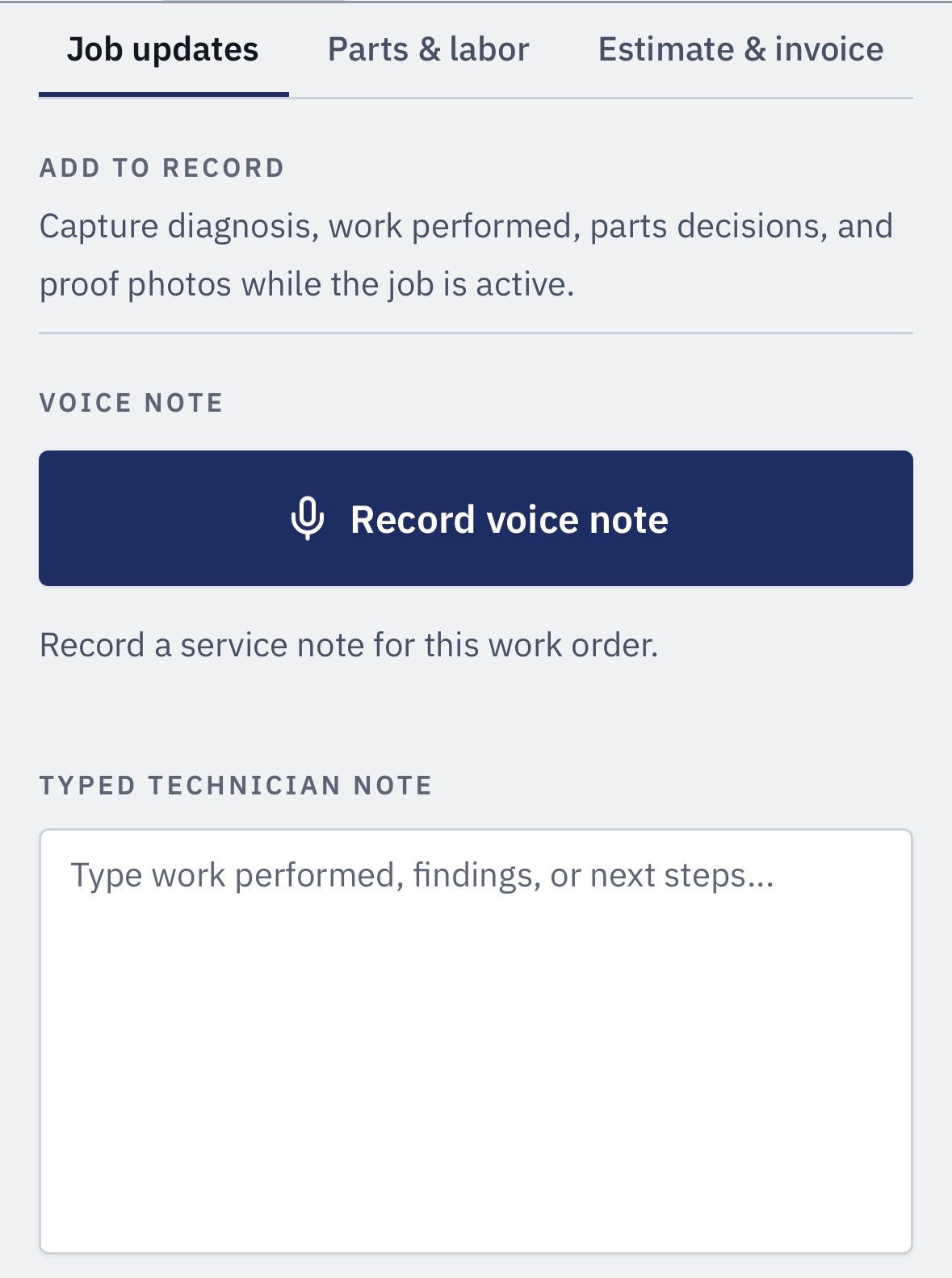
Capture from the bay
Add the finding while the vehicle is still in front of you.
Photos, inspection findings, voice notes, labor, and parts delays stay with the work order. The advisor sees the same repair from the full shop board.
Findings
Notes and photos stay on the repair order.
Voice notes
Record a service note without leaving the bay.
Parts delays
Flag the hold where the rest of the shop can see it.
Independent shops first
Built for a single-location repair shop, not a dealer group.
BayNerve is designed for a small independent team where the owner, service advisor, and technicians are close to the day-to-day work.
01
Self-service setup
Add the shop, people, labor rates, and bays, then begin writing work orders.
02
One shop subscription
Adding a technician, advisor, owner, administrator, or read-only user does not add another seat charge.
03
Phone-ready technician workflow
Technicians can document findings and update the repair without walking back to the counter.
04
The same four job states
Ready to start, in progress, parts hold, and closed keep the work board readable across the shop.
Pricing
$49.99 monthly or $499.99 yearly for the shop.
Monthly and yearly billing cover the same shop plan. Owners, service advisors, technicians, administrators, and read-only users are included without a per-seat subscription charge. Customer card payments processed through BayNerve are separate: BayNerve’s standard platform fee is 3% of the card charge, plus Stripe processing fees.
Shop subscription
$49.99
per month / shop
$499.99 per year / shop
Save $99.89 per year compared with paying monthly.
No per-seat subscription pricing
Owners, advisors, technicians, administrators, and read-only users included
No implementation fee
Cancel anytime
Customer card payments processed through BayNerve use Stripe and are subject to BayNerve’s standard 3% platform fee plus Stripe processing fees.
Start BayNerveDirect answers
Common questions about BayNerve shop management software.
Need something specific? Read the BayNerve resources or email info@gearboxtechnologies.com.
What is BayNerve?
BayNerve is auto repair shop management software for independent repair shops. One repair record can hold the appointment, check-in, digital inspection, estimate, customer decision, technician assignment, labor, parts status, invoice, payment status, and vehicle service history.
How much does BayNerve cost?
BayNerve costs $49.99 per month or $499.99 per year for the shop. The subscription is not priced per user. Customer card payments processed through BayNerve are subject to BayNerve’s standard 3% platform fee plus Stripe processing fees.
Who is BayNerve built for?
BayNerve is built for independent, single-location mechanical repair shops. Roles are available for owners, service advisors, technicians, administrators, and read-only users such as a bookkeeper.
Can technicians use BayNerve on a phone or tablet?
Yes. BayNerve runs in a web browser, and the technician workflow is built for use from a phone or tablet in the bay. A technician can see work, run an inspection, attach photos, record a voice note, log labor, and flag a delay.
Does BayNerve include digital inspections and customer approvals?
Yes. Technicians can document findings with notes and photos. Advisors can build estimates from those findings, and approved, declined, or deferred work stays attached to the repair order.
Does BayNerve keep vehicle service history?
Yes. Completed repairs remain on the vehicle record with findings, photos, approvals, invoice details, and deferred work. Shops can search by customer, vehicle, plate, or repair order.
Does BayNerve include a VIN decoder?
Yes. BayNerve can decode a valid 17-character VIN on a vehicle record using NHTSA vPIC data. When available, the decoded specifications can include trim, engine, body class, drive type, fuel type, and transmission, while the vehicle’s repair and service history stays tied to the same record.
How does setup work?
BayNerve is set up by adding the shop, people, labor rates, and bays, then writing the first work order. There is no separate implementation project or implementation fee.
How do I get started?
Go to app.baynerve.com/signup to create your shop. If you want to see BayNerve before subscribing, request a trial by emailing info@gearboxtechnologies.com.
Start with one repair
Run the shop from one work board.
Create the shop, add the people who need access, and write the first work order. Want to see BayNerve before subscribing? Request a trial by email.
01
Create the shop
Add shop details, people, labor rates, and bays.
02
Write the first work order
Check in the vehicle, assign the work, and keep the repair moving.
03
Keep the history
The finished repair, customer decisions, invoice, and deferred work stay with the vehicle.

